
Not so long ago, the typical search experience went something like this: you’d type your query into a search engine (like Google) and be shown a list of links. From there, you’d scan the results, open a few tabs and piece together the answer yourself.
With AI, that whole experience is being completely redefined.
Instead of returning links to multiple sources, many platforms now generate direct, complete answers. Users can even converse back and forth with the system, asking follow-up questions to refine and expand the results.
This is the era of AI-powered search: an entirely new experience for users, and a whole new ball game for UX designers.
So what does it all mean? In this guide, we’ll explain:
- What AI search is and how it’s changing user behaviour
- What this means for UX designers in practical terms
- How to design effective and trustworthy AI search experiences
Let’s begin.
What is AI search?
AI search is a type of search experience powered by generative AI.
In traditional search (say, typing something into Google), the system retrieves and ranks links. It gives you a list of sources you can click through to find what you need.
In AI search, the system takes on more of that exploration work for you. It interprets your query, pulls (or synthesises) information from multiple sources and then generates a direct answer.
From links to complete answers: how search is changing
To really understand this shift, it’s useful to consider how the search experience plays out in practice.
Let’s imagine you’re searching for the best running shoes for knee pain. You might open Google, type something like “best running shoes knee pain” and be presented with a list of links, including blog posts, product roundups and brand pages.
From there, you’d click on the most promising results and compare the information yourself.

Nowadays, that same search often looks a little different.
Before you even click on a link, you might see an AI-generated overview at the top of the page. This summary pulls together key information and presents it as a direct answer, giving you a quicker sense of your options without needing to leave the page.
Often, the AI snippet can be enough to answer your initial question. In that case, you don’t even need to click through any links.
Notice how, in the following example, the entire area above the fold is dominated by an AI-generated answer.

That’s what happens when traditional and AI-powered search combine.
There’s also a second type of experience where users go directly to platforms like ChatGPT or Copilot.
In these so-called conversational search environments, you can ask more detailed, contextual questions. For example, you might ask ChatGPT: “What are the best running shoes for knee pain if I overpronate? I usually run short distances, between 5-8km”.
This time, the system generates a structured response. It may explain different types of shoes, suggest specific models and provide the reasoning behind those recommendations.
It also allows you to continue the interaction with follow-up questions, such as “What about budget options?” or “Which ones are best for walking?”
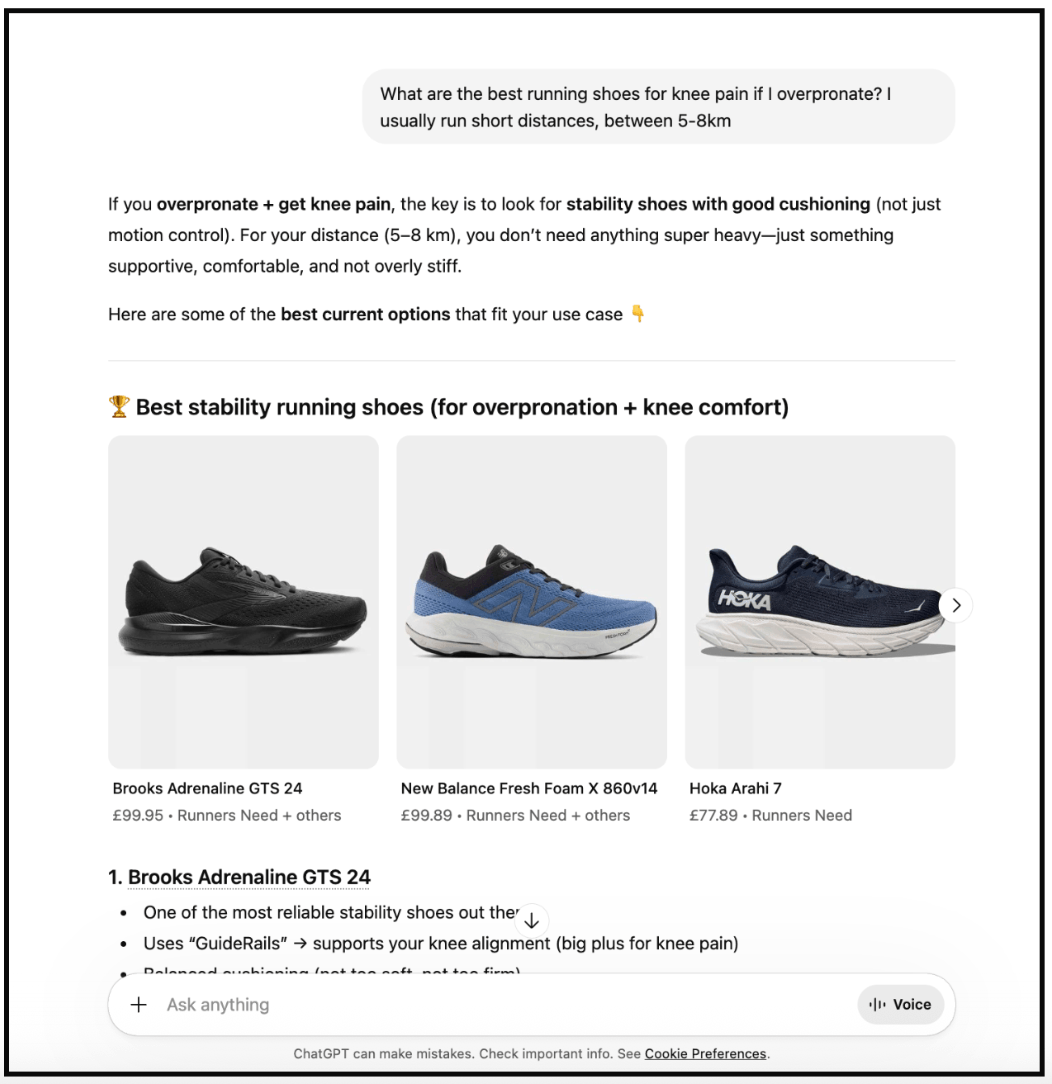
What we’re seeing is a clear progression from simply retrieving information, to actually summarising it and then helping users explore and refine it.
The interaction model has shifted accordingly. Instead of searching, scanning and clicking, users are now asking, receiving and refining. The system takes on more of the cognitive work, helping users move faster from question to understanding and decision-making.
How AI search works (and where LLMs fit in)
To understand why AI search feels so different, it helps to look at what’s happening behind the scenes.
At the centre of these experiences are large language models, or LLMs. These are AI systems trained on vast amounts of text data, which allows them to understand natural language and generate responses that feel human-like.
When a user types a query, the model interprets the intent, identifies relevant information and generates a response based on patterns it has learned. The interface then presents that response in a way the user can read, interact with and refine.
A simple way to think about it is this: the LLM is the brain, and the interface is the conversation. AI search is the interaction that connects the two.
This is what enables the shift from search as retrieval to search as conversation.
Instead of simply returning links, the system can interpret a question, generate an answer and adapt it based on follow-up input. The result is a more dynamic interaction, where the user and system work together to explore a topic.
How AI search is changing user behaviour
Search is changing, and so is the user behaviour around it. Here’s what’s happening when people interact with AI-powered search.
Users are asking more natural, detailed questions
Instead of relying on short keywords, people are increasingly writing full queries in natural language. They include context, preferences and constraints upfront, expecting the system to understand nuance without needing multiple attempts.
We’re moving from queries like “Healthy dinner recipes vegan” to “Can you help me find a healthy, low-calorie vegan dinner recipe that I can cook for friends?”
Search is becoming a multi-step interaction
Rather than starting from scratch each time, users build on previous responses. They ask follow-up questions, refine the scope and gradually move closer to what they need. The experience feels less like repeating a task and more like continuing a conversation.
Expectations have shifted from finding to understanding
Users are no longer just looking for sources. They expect the system to interpret, organise and present information in a way that’s immediately useful. Summaries, comparisons and recommendations are becoming part of the baseline experience.
Click behaviour is becoming more selective
In traditional search, opening multiple links was a necessary step. In AI search, users may click less often but more intentionally. When they do leave the interface, it’s usually to verify a specific claim, explore a recommendation or go deeper on a trusted source.
That’s how search is changing from the end user’s perspective. Next, let’s consider what this means for UX.
What this means for UX designers
As search becomes more conversational, the UX designer’s role is expanding.
You’re no longer just designing how users move through information. You’re designing how they ask for it, how it’s interpreted and how it’s presented back to them in a way they can understand and trust.
That shift has several important implications.
In traditional interfaces, users interact through menus, filters and predefined paths. In AI search, interaction is driven by prompts and responses.
This means thinking beyond individual screens and focusing on the flow of a conversation over time. How does a user start their query? How does the system respond? How easy is it to ask a follow-up question or refine the result?
Good design supports a natural back-and-forth, not just a single interaction.
Supporting prompt-based workflows
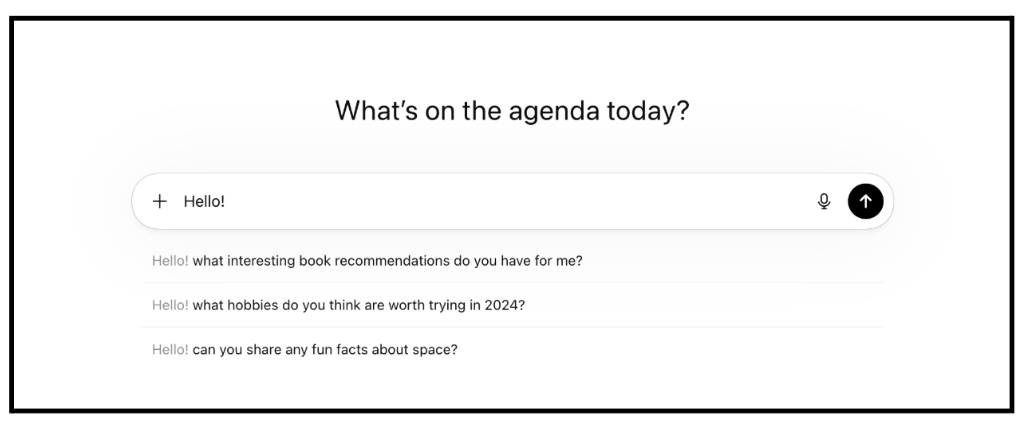
When users are faced with an open input field, knowing what to ask is not always straightforward. Small changes in phrasing can lead to very different results, and users may not understand how to get the best outcome.
Designers need to guide this process by providing examples, suggestions and subtle cues that help users form effective queries without overwhelming them.
You may have already seen examples of this when using tools like ChatGPT:
Prioritising clarity and structure in information
In AI search, the system is doing more of the work of interpreting and presenting information. That makes clarity even more important. Answers need to be well-structured, easy to scan and logically organised so users can quickly grasp the key points.
Clear headings, concise explanations and well-defined sections all contribute to a better experience.
Designing for trust and transparency
When a system generates answers, users need to understand where that information comes from and how much confidence to place in it. This means making sources visible, signalling uncertainty where appropriate and avoiding overly confident or misleading responses.
Trust is not just about accuracy, but about how clearly the system communicates its limitations.
Accounting for ambiguity and imperfection
Users will not always ask perfectly clear questions, and AI systems will not always produce perfect answers. Good UX design helps bridge that gap. This might involve prompting users to clarify their intent, offering ways to refine results or making it easy to recover when something goes wrong.
Designing for humans and machines: an introduction to Machine Experience (MX)
When we talk about designing for AI search, we’re talking about designing for two audiences at once: humans and machines.
In traditional UX design, you focus primarily on the human side of the experience. If you’re designing an e-commerce site, for example, you’re thinking about how customers browse products and make purchases.
In AI-powered search, there’s a second audience involved: the systems that interpret information and generate answers for the user.
This approach is sometimes referred to as Machine Experience, or MX.
Just as UX design focuses on the end user’s experience, MX focuses on the system’s experience. How easily can it interpret, process and generate information based on what you’ve designed?
Put simply, MX is about how well your content and interfaces work for those systems, as well as for the people using them.
That might sound a bit abstract, but it shows up in very practical ways.
If information is unclear or loosely structured, users will struggle to make sense of it. At the same time, AI systems are more likely to misinterpret it or generate less useful responses.
When content is clear and well organised, the opposite happens. Answers are easier to understand, and the system is more likely to produce something accurate and genuinely helpful.
So the way you structure and present information has a direct impact on the quality of the experience.
In many ways, this builds directly on UX fundamentals you’re already familiar with. Principles like clarity, strong hierarchy and thoughtful information architecture play an even more important role in AI-powered experiences.
Understanding this shift helps explain why designing for AI search feels different. You’re shaping not just what the user sees, but what the system is able to understand and return in the first place.
How to design effective AI search experiences: 7 practical tips
Designing for AI search means thinking differently about interaction.
Instead of guiding users through predefined pathways, you’re designing a system that responds to open-ended input. Adopting an MX mindset can help you shape experiences that work well for both the user and the system.
In practice, that means focusing on a few key considerations and design principles.
1. Guide users toward better prompts
Don’t rely on users knowing what to ask. Use placeholder text, prompt suggestions or example queries to help them get started and refine their input.
For example, instead of a blank field, you might include an example prompt that shows the user how to structure their query, or a tooltip they can click on for pointers.
2. Design for follow-up, not one-off queries
Make it easy to continue the interaction. Support quick refinements, preserve context and avoid forcing users to start over each time.
For example, after showing results to an initial query, you might include suggested follow-ups like “Show cheaper options” or “Which ones are healthiest?” that users can tap to refine the response. The overall interaction should feel like a continuous conversation.
3. Structure responses for clarity and speed
Think about how the system presents responses. Break answers into clear sections and make content easy to scan. Users should be able to understand the response at a glance.
For example, a product recommendation could be grouped into headings like “Best overall,” “Best budget option” and “Best for support,” rather than presented as one long paragraph.
4. Make sources and reasoning visible
Help users understand where information comes from and how it was generated. This builds trust and supports verification. For example, you might include links alongside key claims or show a short explanation of why certain recommendations were made.
5. Handle uncertainty and errors gracefully
Avoid presenting every response as definitive. Where appropriate, signal uncertainty and give users ways to refine or double-check the output. For example, when talking about running shoes, the system might say “Results may vary depending on your running style” and prompt the user to provide more detail.
6. Design content that works for both humans and systems
Use clear hierarchy, meaningful labels and well-defined sections so information is easy to interpret and reuse. Well-structured headings and clearly defined sections make it easier for users to skim, and for AI systems to extract and summarise key points.
7. Focus on supporting the users’ decisions, not just delivering answers
With AI-powered search, the goal is not just to present information, but to help users move forward. Design responses that guide comparison, highlight trade-offs or suggest next steps.
After presenting several options, for example, you might include a short comparison or a prompt like “Want help choosing between these?” to guide the next step.
At every stage of the design process, the question shifts from “How do users find information?” to “How do they understand it, refine it and act on it?” Your role is to design a system that supports that interaction, both for the user and for the system shaping the response behind the scenes.
The takeaway
AI search is changing how people find, understand and act on information. We’re shifting from link lists and standalone queries to more complete answers and continuous conversations.
For UX designers, this means shaping a very different kind of interaction. However, you don’t need to start from scratch. Many of the fundamentals of good UX still apply; what’s changing is how those principles are applied in more dynamic, AI-driven contexts.
The first step towards designing effective AI products and experiences is to develop foundational AI literacy. Once you understand how these systems work in practice, you can make better design decisions and collaborate more effectively with technical teams.
For a practical introduction, check out the UX Design Institute’s Certificate in AI Fundamentals for UX. You’ll learn how generative AI works, how to prompt it effectively and how to integrate AI tools into your design workflow. Along the way, you’ll start to develop an MX mindset, enabling you to design more effectively for both users and the systems shaping their experience.
Want to learn more about AI in UX design? Continue with these guides:
- A complete AI for UX glossary: 100 terms all designers should know
- How to design experiences for AI agents: a step-by-step guide
- AI in user research: unlocking new opportunities

Emily is a professional writer and content strategist with an MSc in Psychology. She has 8+ years of experience in the tech industry, with a focus on UX and design thinking. A regular contributor to top design publications, she also authored a chapter in The UX Careers Handbook. Emily also holds a BA in French and German and is passionate about languages and continuous learning.